

Pagination, filtering and ordering
Antavo offers several methods to ensure high-quality API performance when handling, processing, and returning large volumes of customer-related loyalty information.
Pagination
Pagination breaks down large data requests into smaller, more manageable pages. Pagination-enabled endpoints use two parameters:
limit: Specifies the number of entries returned in one response, e.g.,limit=100.offset: Determines the starting position for entries returned in one response, e.g.,offset=10
Using these parameters, a query such as offset=20&limit=1 skips the first 20 entries and returns one entry.
Response structure
A paginated response typically includes links to the next and previous pages.
next: Automatically generated link to access the next series of entries.previous: Automatically generated link to access the previous series of entries.
The exact response structure depends on the API.
Example API request:
The GET /customers/{customer_id}/activities/rewards?offset=2&limit=1 Display API request might result in a response like this:
 {
  "next": "/customers/a222e90f-2c59-468d-9b81-62f560084379/activities/rewards?offset=3&limit=1",
  "previous": "/customers/a222e90f-2c59-468d-9b81-62f560084379/activities/rewards?offset=1&limit=1",
  "data": [
    {
      "type": "coupon",
      "_actions": {
        "complete": {
          "method": "POST",
          "url": "/customers/a222e90f-2c59-468d-9b81-62f560084379/activities/rewards/5e78c52e5553aa0e00000008/claim"
        }
      },
      "id": "5e78c52e5553aa0e00000008",
      "status": "active",
      "title": "20% Off on Winter Collection",
      "description": "Enjoy a 20% discount on our Winter Collection items.",
      "image": {
        "small": "https://antavo.{environment}.com/example1",
        "medium": "https://antavo.{environment}.com/example2",
        "large": "https://antavo.{environment}.com/example3"
      },
      "points": 1
    }
  ]
Supported endpoints
The following API endpoints support pagination:
/customers
/customers/-/events/customers/{customer_id}/events/customers/{customer_id}/transactions/customers/{customer_id}/transactions/{transaction_id}/events/customers/{customer_id}/transactions/-/search/customers/{customer_id}/prize-wheels//customers/{customer_id}/rewards/customers/{customer_id}/activities/rewards/customers/{customer_id}/activities/quizzes/v2/customers/{customer_id}/activities/challenges
/entities/{module}/{entity}
/v1/bulk-operation/reward/claim/{batch_id}/status/error/v1/bulk-operation/customer-list/{batch_id}/status/errors
/rewards
/coupons
/v1/customers/v1/customers/{customer_id}/coupons/v1/customers/{customer_id}/events/v1/customers/{customer_id}/transactions
Filtering
Filtering allows you to narrow down API responses by returning only entities that match specific criteria. Several Antavo APIs support filtering, although the available filter parameters and query syntax may differ between APIs.
Display API
The Display API supports filtering through endpoint-specific query parameters. The available filters are listed below.
Events
Endpoints where filtering is available:
customers/{customer_id}/eventscustomers/-/events
Available filter parameters:
| Filter | Example |
|---|---|
action | customers/{customer_id}/events?action=checkoutcustomers/{customer_id}/events?action=checkout&action=point_add |
date | customers/{customer_id}/events?date.eq=2024-05-01 |
Activities
Endpoints where filtering is available:
/customers/{customer_id}/activities
Available filter parameters:
| Filter | Example |
|---|---|
activity_types | customers/{customer_id}/activities?activity_types=reward,profiling |
fields | customers/{customer_id}/activities?fields=cf\_prize\_cost\ |
Rewards
Endpoints where filtering is available:
customers/{customer_id}/activities/rewardscustomers/{customer_id}/activities/rewards/{reward_id}customers/{customer_id}/rewards
Available filter parameters:
| Filter | Example |
|---|---|
type | customers/{customer_id}/activities/rewards?type=coupon |
points | customers/{customer_id}/activities/rewards?points.eq=100 |
stores | customers/{customer_id}/activities/rewards?stores=001,005 |
starts_at | customers/{customer_id}/activities/rewards?starts_at.lt=2024-07-01&date.gt=2024-05-01 |
ends_at | customers/{customer_id}/activities/rewards?ends_at=2024-07-01 |
status | customers/{customer_id}/activities/rewards?status=activecustomers/{customer_id}/activities/rewards?status=completedcustomers/{customer_id}/activities/rewards?status=scheduled |
Challenges
Endpoints where filtering is available:
customers/{customer_id}/activities/challengescustomers/{customer_id}/challenges/v2/customers/{customer_id}/activities/challenges
Available filter parameters:
| Filter | Example |
|---|---|
ends_at (date) | customers/{customer_id}/activities/challenges?end_at.eq=2024-03-12 |
points (number) | customers/{customer_id}/challenges?points.eq=100 |
tags (string - list) | customers/{customer_id}/activities/challenges?tags=2024,in-store |
NoteThe "date" filter accepts datetime values in ISO 8601 format (YYYY-MM-DD), ensuring machine-readable entries. Invalid entries, such as
?date=lastyear, will result in an empty query response rather than an error.
NoteFor
pointsand date-type parameters (date,ends_at,starts_at), make sure you use query operators. Find instructions on how to use them in the Query operators section below.
Display API query operators
Filtering can be extended by adding query parameters in the following format:
attribute.operator=value
Available operators:
| Operator | Explanation |
|---|---|
eq | equals (default) |
gt | greater than |
gte | greater than or equal |
in | in - accepts a comma-separated list of values |
lt | less than |
lte | less than or equal |
ne | not equals |
nin | not in - accepts a comma-separated list of values |
If an operator is omitted, eq is used by default. To avoid conflicts with special query parameters (for example, limit for pagination), explicitly specify the eq operator. For example, use limit.eq instead of limit.
Filters can be combined to define ranges, for example:
?price.gte=10&price.lte=20
Custom attributes
Entities within Antavo can be filtered using custom attributes configured via the Custom entities module in the Antavo Management UI. This module allows extending existing built-in entities with new attributes or creating entirely new entities. The list of attributes is available through the Attributes tab of the entity configuration interface.
To enable filtering by an attribute, ensure it is tagged as filterable and api in the Tags section. An attribute can be used for filtering by adding the following query: entity_attribute=query_value
Example:
The Reward entity has a custom boolean attribute cf_priority
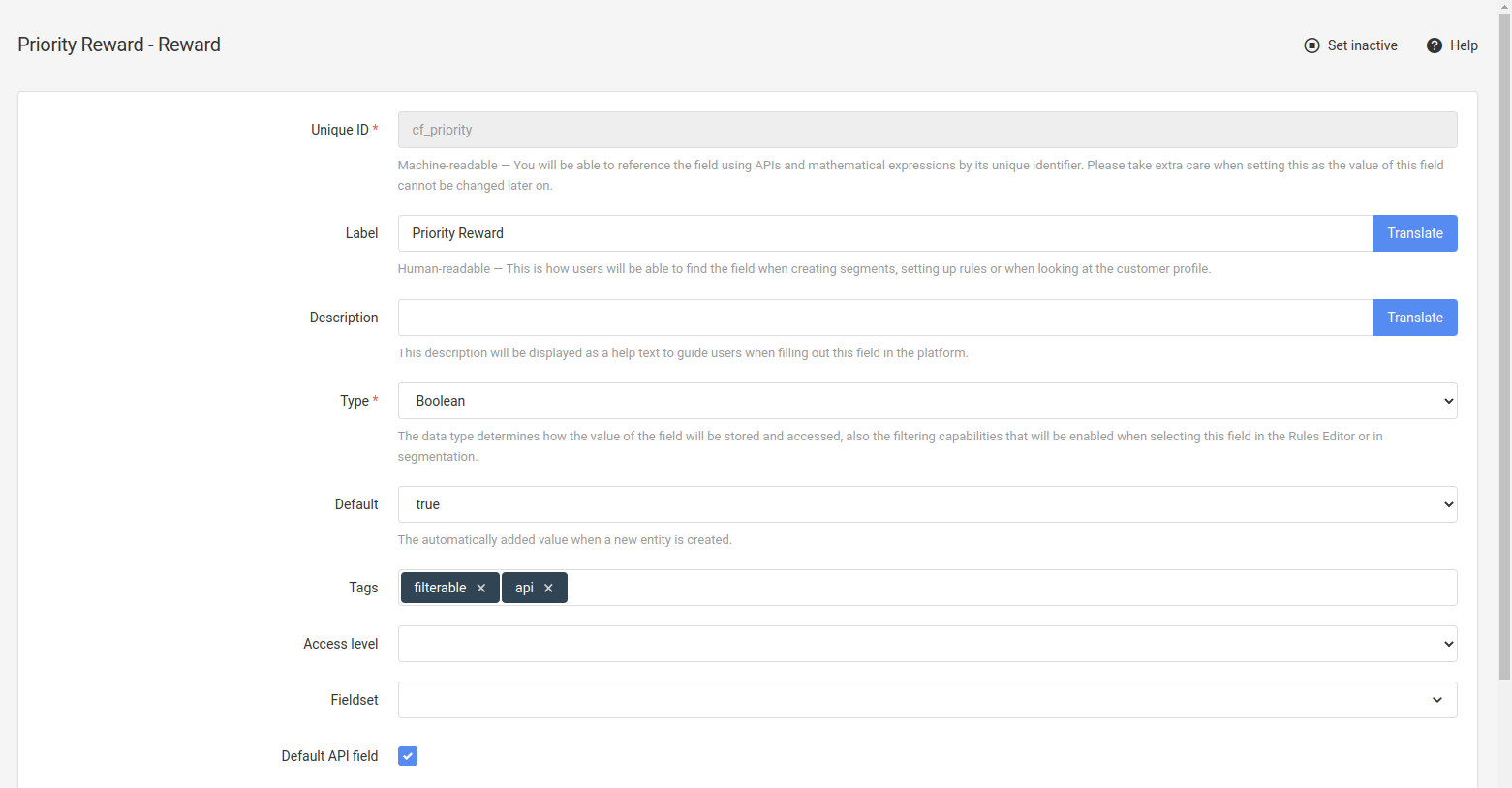
To filter based on the value of this attribute, use the following request:
GET https://api.{environment}.antavo.com/customers/{customer_id}/activities/rewards?cf_priority=false
API response:
{
  "data": [
      {
          "type": "download",
          "_actions": {
              "complete": {
                  "method": "POST",
                  "url": "/customers/001/activities/rewards/637794598bacbc280e4952e4/claim"
              }
          },
          "id": "637794598bacbc280e4952e4",
          "status": "active",
          "title": "Low priority reward",
          "description": "a generic reward",
          "image": {
              "small": "https://antavo.{environment}.com/brands/1567/media/1668780684-Gboja.png",
              "medium": "https://antavo.{environment}.com/brands/1567/media/1668780683-TjuvC.png",
              "large": "https://antavo.{environment}.com/brands/1567/media/1668780683-ASyuP.png"
          },
          "points": 0,
          "cf_priority": false
      }
  ],
  "time": 0.105
}
NoteWhile a field marked as
filterableallows for filtering, its optimization for performance cannot be assumed. It is crucial to thoroughly test every filtered operation.
Loyalty Read API
The Loyalty Read API uses the following filter syntax:
filter[attribute][operator]=value
The following endpoints support filtering:
/v1/customers/v1/customers/{customer_id}/coupons/v1/customers/{customer_id}/events/v1/customers/{customer_id}/transactions
The available filter parameters depend on the endpoint. Refer to the endpoint documentation in the API reference for the supported filter fields and operators.
NoteDate filters accept the following formats:
YYYY-MM-DD- interpreted as midnight UTCYYYY-MM-DDTHH:MM:SS- interpreted as UTC when no time zone offset is providedYYYY-MM-DDTHH:MM:SSZ- UTC timeYYYY-MM-DDTHH:MM:SS±HH:MM- includes a UTC offset and is converted to UTC for comparisonInvalid calendar dates (for example
2026-02-31) are rejected.
Loyalty Read API query operators
Filtering is performed using query parameters in the following format:
filter[attribute][operator]=value
The available operators depend on the endpoint and the filter field. Refer to the relevant endpoint reference in the Loyalty Read API endpoint documentation for the supported operators of each filter.
For example, the following query filters customers created between two dates:
?filter[created_at][gte]=2026-01-01&filter[created_at][lte]=2026-12-31
Multiple filter conditions can be combined by specifying additional filter parameters. For example:
?filter[status][eq]=active&filter[created_at][gte]=2026-01-01
Ordering
API responses can be sorted based on one or more fields. The available sorting fields and query syntax depend on the API and endpoint.
Display API
The Display API uses the sort parameter to select the field and the order parameter to specify the direction.
| Parameter | Description | Options |
|---|---|---|
sort | Specifies the field used to sort the results. | The supported fields depend on the endpoint and may include starts_at, ends_at, points, and title. |
order | Specifies the direction in which the results are returned. | asc ascending, defaultdesc descending |
Example API request:
GET https://api.{environment}.antavo.com/customers/{customer_id}/activities/rewards?sort=points&order=desc
Supported endpoints
/customers/-/events/customers/{customer_id}/events/customers/{customer_id}/rewards/customers/{customer_id}/activities/rewards/v2/customers/{customer_id}/activities/challenges
Loyalty Read API
The Loyalty Read API uses indexed sort parameters. Each sort instruction specifies a field and a direction:
sort[index][field]=attribute&sort[index][direction]=asc|desc
For example:
?sort[0][field]=created_at&sort[0][direction]=asc
Multiple sort instructions can be combined. The first field is used as the primary sort field. Each additional field determines the order of results that have the same value for the preceding field.
For example:
?sort[0][field]=status&sort[0][direction]=asc&sort[1][field]=created_at&sort[1][direction]=desc
The supported sort fields depend on the endpoint. Refer to the relevant endpoint reference for the available values.
Supported endpoints
/v1/customers/v1/customers/{customer_id}/coupons/v1/customers/{customer_id}/events/v1/customers/{customer_id}/transactions
Updated 3 months ago